Information architecture
Navigation, page relationships, categories, labels and internal links.

A successful redesign is not a visual reset. It is a controlled improvement to structure, content, user experience and technology—with careful protection for useful pages, search visibility, customer habits and operational knowledge.
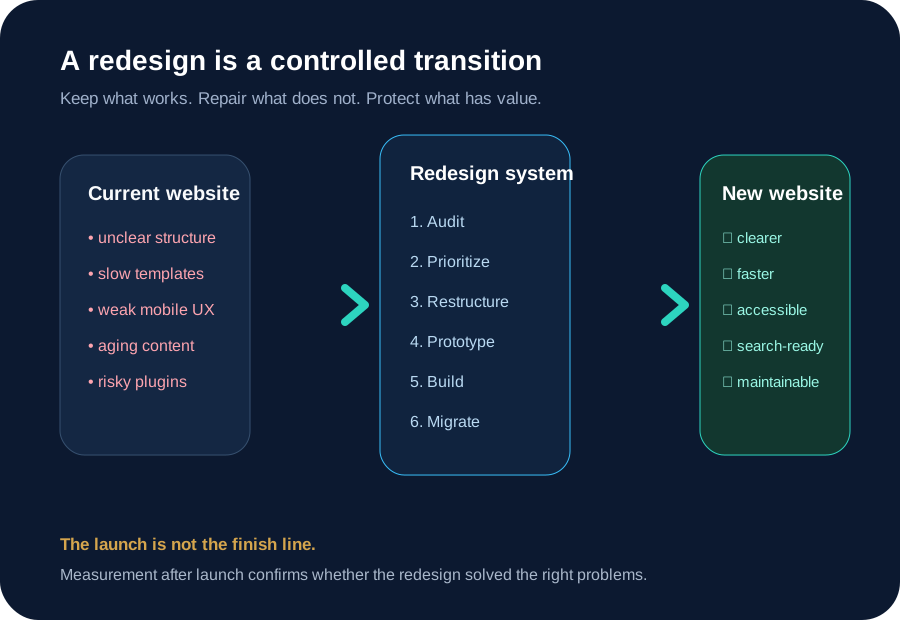
A website can remain technically online while becoming progressively less useful. Services change, teams add pages without a shared structure, mobile expectations rise, plugins accumulate, search engines encounter conflicting signals and the visual identity no longer reflects the organization. The website still “works,” but every update becomes slower and every visitor has to work harder.
A redesign addresses this accumulated mismatch. It examines what the business needs the website to do now, which audiences matter, which content deserves to remain, what technology is creating friction and how the experience should support future growth. The new interface is important, but it is the visible result of deeper decisions.
That is why beginning with colour palettes or homepage mockups often produces disappointing results. A polished surface cannot repair an unclear service hierarchy, duplicated pages, broken enquiry path or risky publishing workflow. Design becomes more effective after the project establishes the content model, user journeys, technical constraints and measures of success.
Navigation, page relationships, categories, labels and internal links.
What is retained, consolidated, rewritten, expanded or retired.
Typography, spacing, components, forms, tables and responsive behaviour.
Templates, CMS, code, integrations, hosting, security and deployment.
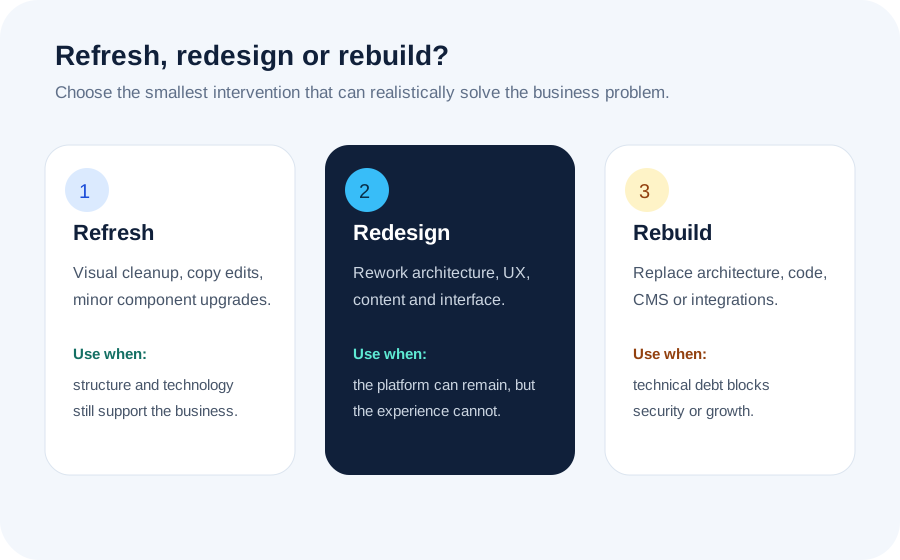
Not every website needs complete replacement. The right approach solves the problem without creating unnecessary migration risk.
A useful audit separates symptoms from causes. It combines business questions, content inventory, analytics, search data, technical inspection and direct experience using the website.
Can a new visitor identify what the organization offers, who it serves and where to begin?
Are important pages reachable through understandable labels and logical paths?
Can people read, compare, complete forms and use controls comfortably on smaller screens?
Are pages accurate, distinct, useful and aligned with current customer questions?
Which URLs attract impressions, clicks, links or local visibility—and which create duplication?
Do templates, scripts, fonts and media create avoidable delay or instability?
Can people navigate with keyboards, understand labels and perceive content with sufficient contrast?
Can the team update the website without fear, specialist workarounds or plugin conflicts?
Are domain, hosting, analytics, source files and third-party accounts controlled transparently?
A weak mobile menu that blocks enquiries matters more than five minor styling inconsistencies. Rank findings by business impact, user harm, search risk, security exposure and maintenance cost.
Each stage reduces uncertainty before the project commits to more expensive decisions.
Define business priorities, audiences, publishing needs, integrations, legal requirements, ownership and measures of success. Review what prompted the redesign and what must not be disrupted.
Catalogue URLs, page purposes, traffic, backlinks, forms, documents, media, structured data and third-party dependencies. This inventory becomes the basis for content and migration decisions.
Organize services, resources, proof and company information into a hierarchy visitors can understand. Define navigation, page types, internal linking and content ownership before visual design expands.
Test how people move from landing pages to explanations, comparisons, evidence and contact actions. Wireframes expose missing content and confusing choices earlier than polished mockups.
Create reusable patterns for headings, cards, calls to action, forms, tables, media and educational content. Components improve consistency, accessibility and future maintenance.
Move only what deserves to remain. Rewrite weak introductions, merge overlapping pages, update facts, add missing context and preserve material that already answers important questions well.
Test responsive behaviour, accessibility, forms, metadata, schema, redirects, analytics, browser behaviour, performance and account ownership. Resolve launch blockers before changing the public environment.
Watch forms, logs, analytics, crawl behaviour, indexing, search visibility and user feedback. A redesign is complete only after the live system proves that critical journeys and signals survived the transition.
Content migration is often treated as copying text from one template into another. That approach carries old problems into the new site. A stronger migration asks what each page is for, who needs it, whether another page already serves the same intent and what evidence supports keeping it.
Every URL should receive a disposition: keep, improve, merge, redirect, archive or remove. The decision should consider customer value, business relevance, search performance, external links, legal obligations and maintenance effort. Pages are not valuable merely because they exist, but deleting them casually can remove years of accumulated visibility and trust.
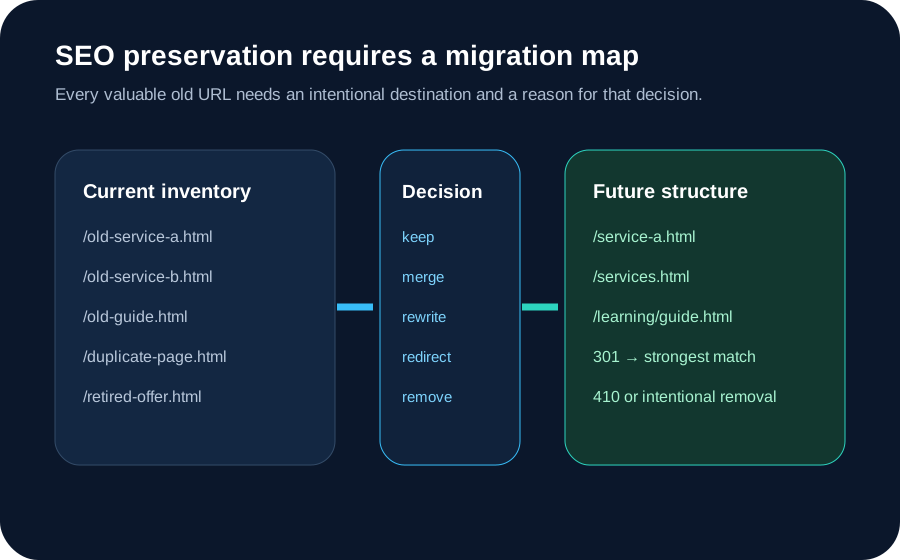
Search risk is created when a redesign changes crawlable URLs, content, internal links or technical signals without understanding their current value. A page that looks unimportant to a design team may be the entry point for qualified visitors, the target of external links or the strongest explanation of a specific service.
Before migration, record indexed URLs, search queries, organic landing pages, backlinks, canonical targets, structured data and internal linking. When the future structure is approved, map each old address to the closest relevant new destination. Keep stable URLs when the page purpose remains stable. Use permanent redirects when consolidation or restructuring genuinely improves the information architecture.
After launch, verify that redirects resolve in one step, canonical tags point to final URLs, XML sitemaps contain only preferred pages and important content remains reachable through crawlable navigation. Search Console, analytics and server logs can reveal missed pages, redirect chains, unexpected 404 responses and changes in crawl behaviour.
A shorter or prettier address does not compensate for unnecessary migration risk. Change URLs for a clear architectural reason, then document the decision.
A redesign should improve how the website behaves, not simply how screenshots appear.
Plan reading width, controls, imagery, tables, navigation and content order across varied screens.
Ensure menus, dialogs, accordions, forms and interactive controls work without a mouse.
Make the current keyboard position visible instead of removing browser focus styles.
Set limits for scripts, fonts, images and third-party tools before the design depends on them.
Use animation to clarify change and respect visitors who request less motion.
Components should tolerate long headings, translation, zoom and variable content without breaking.
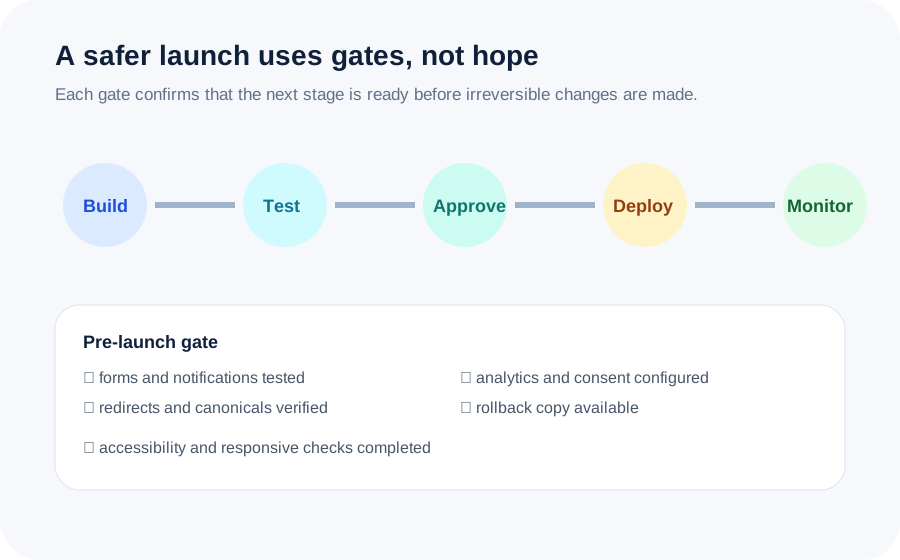
A redesign launch may involve files, databases, DNS, email delivery, forms, analytics, consent tools, redirects and third-party services. Even a simple static website should have a current backup, a tested deployment method and a way to restore the previous version.
Assign responsibility for the launch window. Record who controls the domain and hosting, who verifies forms, who reviews redirects and who watches analytics and logs. Avoid combining unrelated infrastructure changes unless they are necessary; changing platform, domain, email and analytics simultaneously makes problems harder to diagnose.
Visual improvement matters, but the project should be connected to outcomes that reflect the website’s role.
Track visits to important explanatory pages, use of comparison content, contact quality and recurring pre-sales questions.
Measure form completion, downloads, bookings, account actions or other meaningful journeys rather than page views alone.
Monitor indexed pages, organic landing pages, query visibility, crawl errors and performance of migrated URLs.
Compare the effort required to publish, fix content, manage plugins, train staff and recover from errors.
Review real-user performance, accessibility defects, security exposure, browser errors and failed requests.
Confirm that new services, guides and case studies can be added within the system without creating another redesign crisis.
Use this workbook to document why the project is needed, audit the current site, inventory content, record URL decisions, prepare launch checks and define measurable outcomes.
A redesign is worth considering when the site no longer supports the business: visitors struggle to find information, mobile use is awkward, updates are risky, performance is weak, the visual identity feels disconnected, or the current structure cannot accommodate new services. Age alone is not the deciding factor. The evidence should come from usability, analytics, search visibility, maintenance effort and business priorities.
A refresh changes surface-level presentation while preserving most structure. A redesign rethinks information architecture, content hierarchy, interface patterns and user journeys. A rebuild replaces significant technical foundations such as the CMS, templates, codebase, integrations or hosting architecture. Many projects combine redesign and rebuild, but the distinction helps define scope and risk.
It can if URLs, content, internal links, metadata or indexation signals are changed without a migration plan. A well-managed redesign inventories existing pages, identifies valuable rankings and backlinks, maps old URLs to relevant destinations, preserves useful content, validates canonical tags and sitemaps, and monitors search performance after launch.
Stable, descriptive URLs should usually remain when the page purpose remains the same. Changing a URL creates migration work and introduces risk without automatically improving rankings. URLs should change when the new information architecture genuinely requires it, when the old address is misleading, or when multiple weak pages are being consolidated into one stronger resource.
Content should be evaluated page by page. Some material may only need clearer headings and formatting. Other pages may need consolidation, expansion, factual updates or complete replacement. The goal is not to rewrite everything for the sake of activity; it is to ensure every retained page has a clear audience, purpose and next step.
A focused small-business redesign may take several weeks, while a large content migration or custom platform may take several months. Timing depends on audit depth, stakeholder approvals, content readiness, functionality, integrations, accessibility requirements and the number of migration decisions. The schedule should include discovery, prototyping, development, content migration, testing and post-launch validation.
Usually yes. Development should occur in a protected staging environment or separate build so the public site remains available. The launch plan then coordinates backups, deployment, DNS or hosting changes, redirects, testing and rollback. Content that changes frequently may require a final migration window before launch.
Testing should cover navigation, forms, email delivery, responsive layouts, keyboards, focus states, contrast, images, downloads, metadata, structured data, redirects, canonicals, analytics, consent controls, browser compatibility and performance. The team should also verify ownership of domains, hosting, backups and third-party accounts.
Understand the complete planning, design and development process.
ServicePlan layouts and interactions for varied screens and input methods.
ServiceProtect crawling, indexing, schema and performance signals.
Learning CenterTurn goals, audiences and requirements into a practical brief.
GuideCoordinate content, URLs, technology and deployment safely.
ChecklistValidate critical systems before and after deployment.
Tell us what the current website makes difficult, what must be preserved and what the replacement should help your business accomplish.