
Define launch readiness
A launch date is not evidence that the site is ready. Create acceptance criteria for priority pages, forms, devices, integrations, migration signals and operational ownership. Record known limitations rather than allowing them to remain invisible.
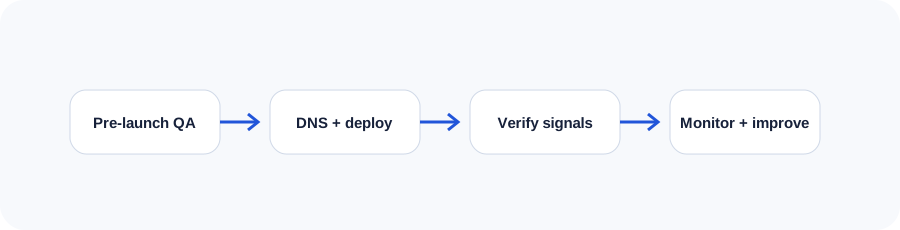
Complete content and visual QA
Review headings, spelling, dates, contact information, calls to action, images, downloads and legal content. Test responsive layouts using real content at narrow and wide widths. Confirm that important meaning is not embedded only in images.
Verify the technical foundation
Confirm HTTPS, canonical URLs, sitemap, robots directives, status codes, structured data and page metadata. Remove staging restrictions, development tags and test accounts. Check server logs and error handling.
Protect existing URLs
Create a one-to-one redirect map where URLs change. Avoid sending every retired page to the homepage. Crawl the new site, test old priority URLs and preserve useful internal links. Keep the redirect map as project documentation.
Test forms, analytics and operations
Submit every form and verify the confirmation, notification, storage and reply path. Test analytics consent and conversion events. Confirm who receives alerts and who can correct a production problem.
Deploy with a rollback plan
Take a current backup, record DNS values, schedule responsible people and define the rollback threshold. Lower DNS time-to-live before a major move when appropriate. Do not make unrelated changes during the launch window.
Monitor after launch
Check uptime, logs, forms, analytics, indexation, redirects and user feedback. Compare performance and conversions to pre-launch baselines. Prioritize defects, then schedule improvements that were intentionally deferred.
Use the companion workbook
Turn the lesson into a practical review with prompts, checklists and space for project notes.
Frequently asked questions
When is the best time to launch?
Choose a low-risk period when the technical and business teams are available to verify results and respond to problems.
How long should redirects remain?
Important permanent redirects should generally remain for the long term, especially when old URLs still receive links or traffic.
Should a site be perfect before launch?
It should meet agreed acceptance criteria and avoid known critical defects. Lower-priority enhancements can follow through a controlled backlog.
What should be backed up?
Website files, databases, configuration, DNS records, redirect maps and other assets needed to restore service.
How soon should analytics be reviewed?
Verify collection immediately, then review early trends carefully. Meaningful comparisons often require enough time and traffic to reduce noise.
Continue learning
Use the next guide, an interactive tool or the related service page to turn this lesson into a practical decision.