
Why internal links matter
Internal links help visitors move from one useful idea to the next. They also help crawlers discover pages, understand relationships and estimate which pages are central. A website with excellent individual pages can still feel weak when those pages operate as isolated islands. Internal linking turns a collection into a system.
In practice, this means documenting the decision, assigning ownership and checking the result after launch. The details vary by project, but the principle remains the same: make the system understandable enough that another qualified person can maintain it without guessing.
Navigation versus contextual links
Global navigation provides predictable access to major sections. Breadcrumbs communicate hierarchy. Contextual links inside a paragraph explain why another page is relevant at that moment. Related-guide cards support exploration after a reader completes a section. Each link type serves a different purpose; repeating the same giant menu everywhere is not a substitute for thoughtful context.
In practice, this means documenting the decision, assigning ownership and checking the result after launch. The details vary by project, but the principle remains the same: make the system understandable enough that another qualified person can maintain it without guessing.
Anchor text and clarity
Descriptive anchor text helps people scan and tells systems what the destination covers. Generic phrases such as click here or learn more provide little context, especially for screen-reader users. Exact-match keywords should not be forced into every link. Natural variation is healthier when the wording accurately describes the destination.
In practice, this means documenting the decision, assigning ownership and checking the result after launch. The details vary by project, but the principle remains the same: make the system understandable enough that another qualified person can maintain it without guessing.
Topic hubs and learning paths
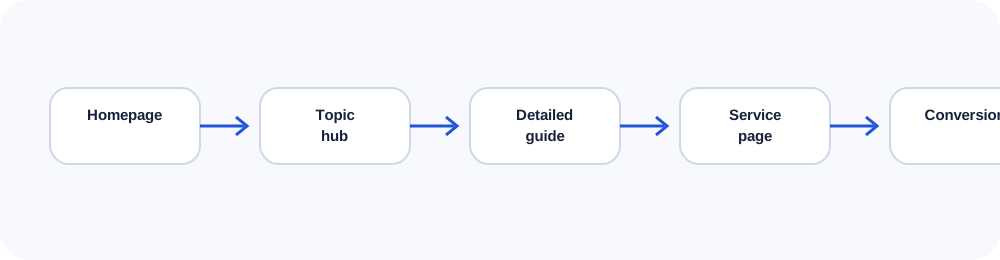
A hub introduces a subject and organizes supporting pages. For example, an SEO hub can connect technical SEO, structured data, internal linking, content strategy and AI search. Supporting pages should link back to the hub and laterally when the connection is genuinely useful. This creates a navigable topic model rather than an arbitrary cluster.
In practice, this means documenting the decision, assigning ownership and checking the result after launch. The details vary by project, but the principle remains the same: make the system understandable enough that another qualified person can maintain it without guessing.
Auditing internal links
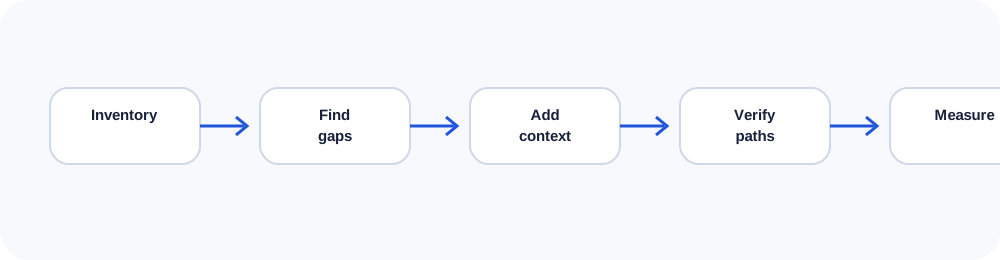
Start with a list of indexable URLs. Identify orphan pages, pages with excessive links, redirected destinations, repeated anchors and important pages buried several clicks deep. Review templates separately from editorial links. Automated crawling reveals patterns, but a human review determines whether the path makes sense.
In practice, this means documenting the decision, assigning ownership and checking the result after launch. The details vary by project, but the principle remains the same: make the system understandable enough that another qualified person can maintain it without guessing.
Maintaining link equity during change
Redesigns and migrations often break established pathways. Map old URLs to relevant replacements, update internal links to final destinations, preserve useful hubs and test navigation after deployment. Redirect chains waste time and make maintenance harder.
In practice, this means documenting the decision, assigning ownership and checking the result after launch. The details vary by project, but the principle remains the same: make the system understandable enough that another qualified person can maintain it without guessing.
Use the companion workbook
Turn the ideas in this lesson into a documented audit, decision or implementation plan.
Frequently asked questions
How many internal links should a page contain?
Use as many as genuinely help the reader; there is no universal ideal number.
Are breadcrumbs internal links?
Yes. They clarify hierarchy and provide a reliable upward path.
Should every page link to the homepage?
The logo and navigation normally provide that route; contextual homepage links are rarely necessary.
What is an orphan page?
An orphan page has no discoverable internal link from the site, even if it appears in a sitemap.
Do footer links count?
They count, but template-wide footer links do not replace relevant links within the main content.
Continue learning
Use the next guide, an interactive tool or the related service page to turn this lesson into a practical decision.